Skip to content

Expense management for small businesses and teams on the road

One receipt, one photo. The numbers add up.

The expense management app that reads your receipts, works out your trips and gets every expense approved. It checks that subtotal + taxes + tip = amount paid, and never guesses.

30-day free trial · No credit card · Up to 5 employees

For small businesses and transport, the public sector, accountants, and just for you. See who it’s for

Illustration: IDEP reads the receipt from Pièces de camion Démo dated November 4, 2026. Subtotal $125.00, GST $6.25, QST $12.47, total paid $143.72. 125.00 + 6.25 + 12.47 = 143.72: the amounts match. The suggested category, Supplies, is marked “To check”.
  • Data hosted in Canadaon Microsoft Azure; some processing, including the AI assistant, may happen outside Canada. The details

  • GST, QST, HST and PSTeach tax, and the vendor’s tax numbers

  • Phone, tablet, computerIDEP web today; coming soon to the App Store and Google Play

  • In French and Englishthe app and its emails alike

The life of a receipt

From the truck cab to your accountant’s file

Follow Lucas’s receipt. He drives for Transport Démo Boréal: $143.72 in parts, paid on November 4. Six steps, and at each one you know where it stands.

Demo data: the company, the people and the amounts are fictional. The screenshots come from IDEP’s iPhone app, coming soon to the App Store; the other visuals are illustrations of its screens.

01PhotographDraft

One photo, from the truck cab

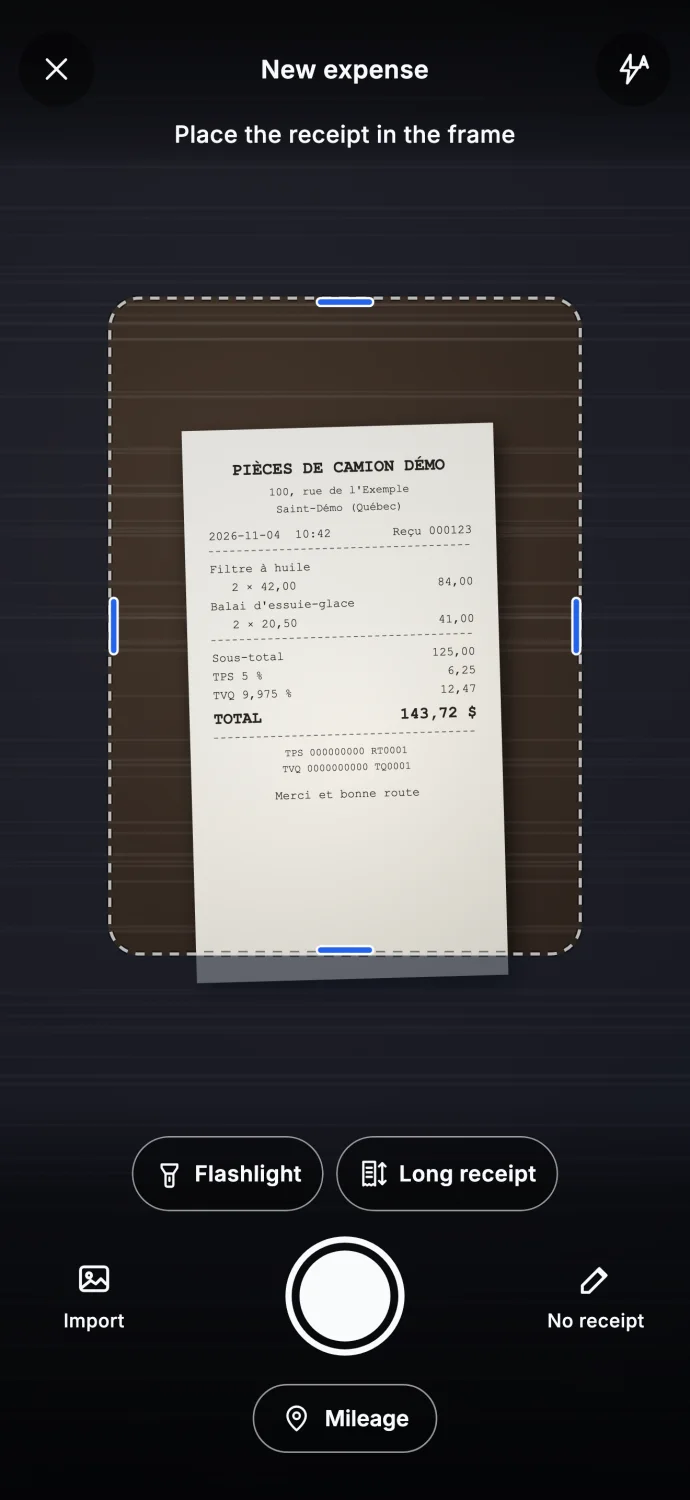
Lucas snaps his receipt before getting back on the road. One photo is enough: IDEP reads it and prepares the expense draft.
More details
  • The “Long receipt” frame takes in the whole of a gas-station or hardware-store receipt.
  • In the iPhone and Android apps (coming soon to the App Store and Google Play), the flashlight lights the receipt, even at night.
  • On IDEP web, the camera opens in the phone’s or tablet’s browser; you can also import a photo or a PDF.
  • No receipt? Enter the expense by hand: the approver will see there isn’t one.
Illustration: in the cab, at night, Lucas’s receipt is framed and lit by the flashlight. Beside it, a screenshot of the iPhone app’s “New expense” screen: the camera frames the same receipt, with the “Flashlight”, “Long receipt” and “Import” buttons.
Screenshot of IDEP’s iPhone app: the “New expense” camera frames a truck-parts receipt.

02ReadDraft

Read line by line, tax by tax

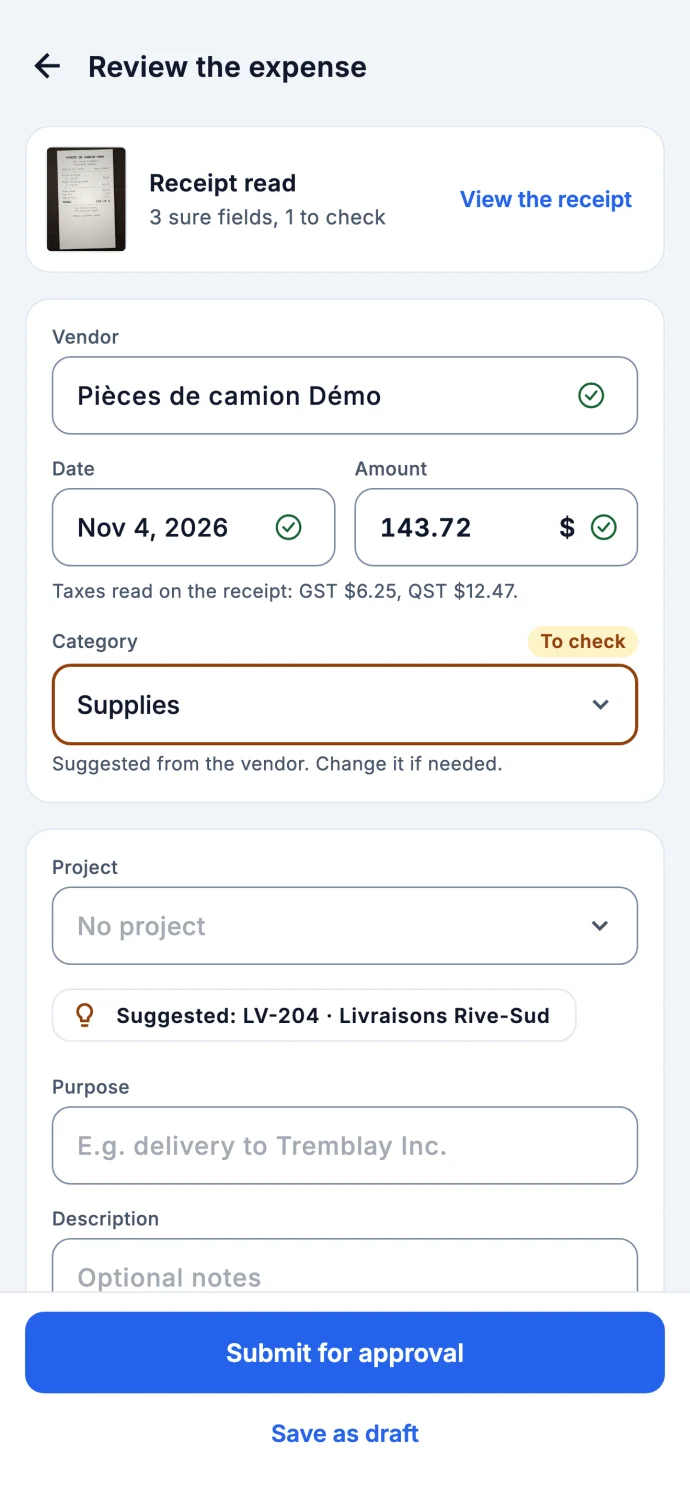
IDEP reads the vendor, the date, each tax, the tip and the total paid. A less certain field is marked “To check”: you always have the last word.
More details
  • Each tax (GST, HST, QST, PST) is kept with the vendor’s tax numbers.
  • The subtotal, the tip on the card slip and the payment details are read too.
  • You correct what needs correcting before you submit.
The paper receipt beside a screenshot of the iPhone app’s “Review the expense” screen: the vendor, date, taxes and total read on the paper appear in the fields, with a check mark; the suggested category is marked “To check”.
Screenshot of IDEP’s iPhone app: “Review the expense”, with the vendor, date and amount read, the GST and QST, and the category to check.

03BalanceDraft

The equation closes, or IDEP tells you

IDEP checks that subtotal + taxes + tip = amount paid, to within 2 cents (tax rounding), and each tax against its rate. When there is a difference, nothing is corrected for you.

Try another receipt: a tip, an Ontario receipt, a difference.

Illustration, four examples of the check: a receipt’s amounts are added up and compared with the amount paid.
  • GST: 5% of $125.00 = $6.25
  • QST: 9.975% of $125.00 = $12.47
  • Vendor’s numbers: GST and QST read
125.00subtotal + 6.25GST + 12.47QST = $143.72total paid
The amounts match

04SubmitSubmitted

The same receipt doesn’t go through twice

IDEP recognizes a receipt it has already seen: the same photo, the same transaction, the same purchase. It shows you the existing expense instead of creating a second one.

More details
  • A receipt photographed again updates its draft.
  • Already submitted by you? You can explain why this one is different. Submitted by someone else? The approver and finance see it, and nothing is blocked.
  • A mistake after sending? Until a final decision is made, you can take the expense back to change it.
Illustration: Lucas’s receipt, already submitted, is photographed a second time. Same photo, same transaction, same purchase: IDEP shows “This receipt seems to be in your expenses already.”

05ApproveUnder review

The right person decides, even during an absence

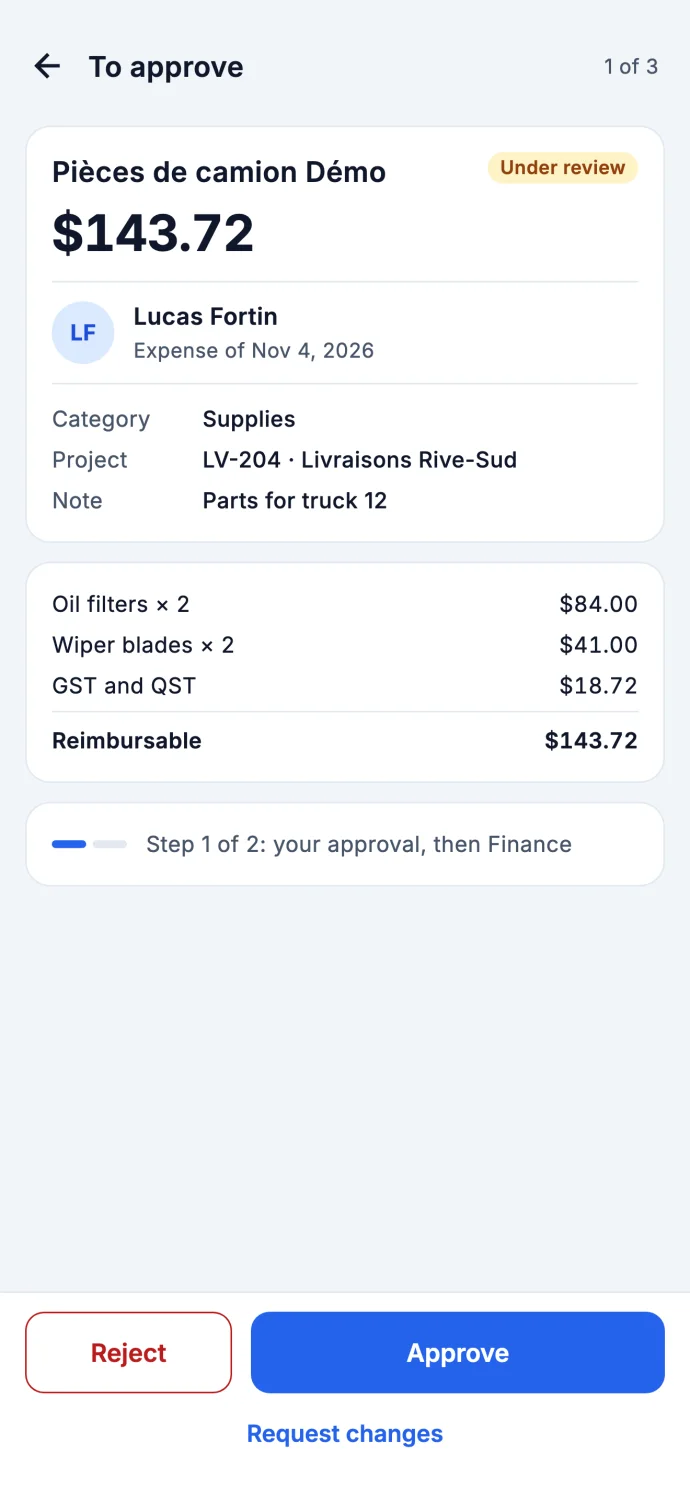
The designated person approves, rejects or asks for a correction. If they are away, the expense goes to their backup, and the trail says so: “standing in for”.
More details
  • No one approves their own expense, not even an administrator.
  • If your company asks for it, a step left waiting gets a reminder, then is passed on.
  • Every decision is kept, with the person’s name and the date.
Illustration of the expense’s trail: submitted by Lucas Fortin, approved by Noah Bergeron standing in for Camille Gagnon, who is away, then by finance. Below, a screenshot of the iPhone app: the “Reject”, “Approve” and “Ask for a correction” buttons.
Screenshot of IDEP’s iPhone app: for an expense to approve, the “Reject”, “Approve” and “Ask for a correction” buttons.

06ExportPaid

Ready for payroll and accounting

Your expenses export to CSV, Excel or PDF, with each one’s taxes, tax by tax when they are printed on the receipt.

More details
  • On demand, or on a schedule: a link to the file goes out by email.
  • Your external accountant gets read-only access at no charge: they view and export, and change nothing.
  • Your company reimburses, through payroll or by transfer, then marks the expense “Paid”.
Illustration: in the November 2026 expense table, Lucas’s receipt has become a line of $143.72. It goes into a CSV, Excel or PDF file; a link to the file goes out by email on the first of each month. The expense is then marked “Paid”.

PaidLucas’s receipt has reached the end of its journey.

Transport Démo Boréal reimburses Lucas through payroll, then marks the expense “Paid”. From receipt to reimbursement, the numbers add up, and everyone knew where it stood.

Trips and mileage

The route draws itself, the amount adds up

Three days later, Lucas has a delivery in Drummondville. The distance comes from the road route, not from a straight line on the map; the amount follows your company’s rate or the official scale.

Trip of November 7Example

  1. StartEntrepôt Démo, Saint-Hyacinthe
  2. 1Stop 1Client Démo, Saint-Simon14.2 km
  3. 2Stop 2Client Démo, Sainte-Hélène-de-Bagot12.6 km
  4. DestinationQuai Démo, Drummondville22.9 km
Distance
49.7 km
2026 CRA rate
$0.73 per km
Reimbursable amount
$36.28

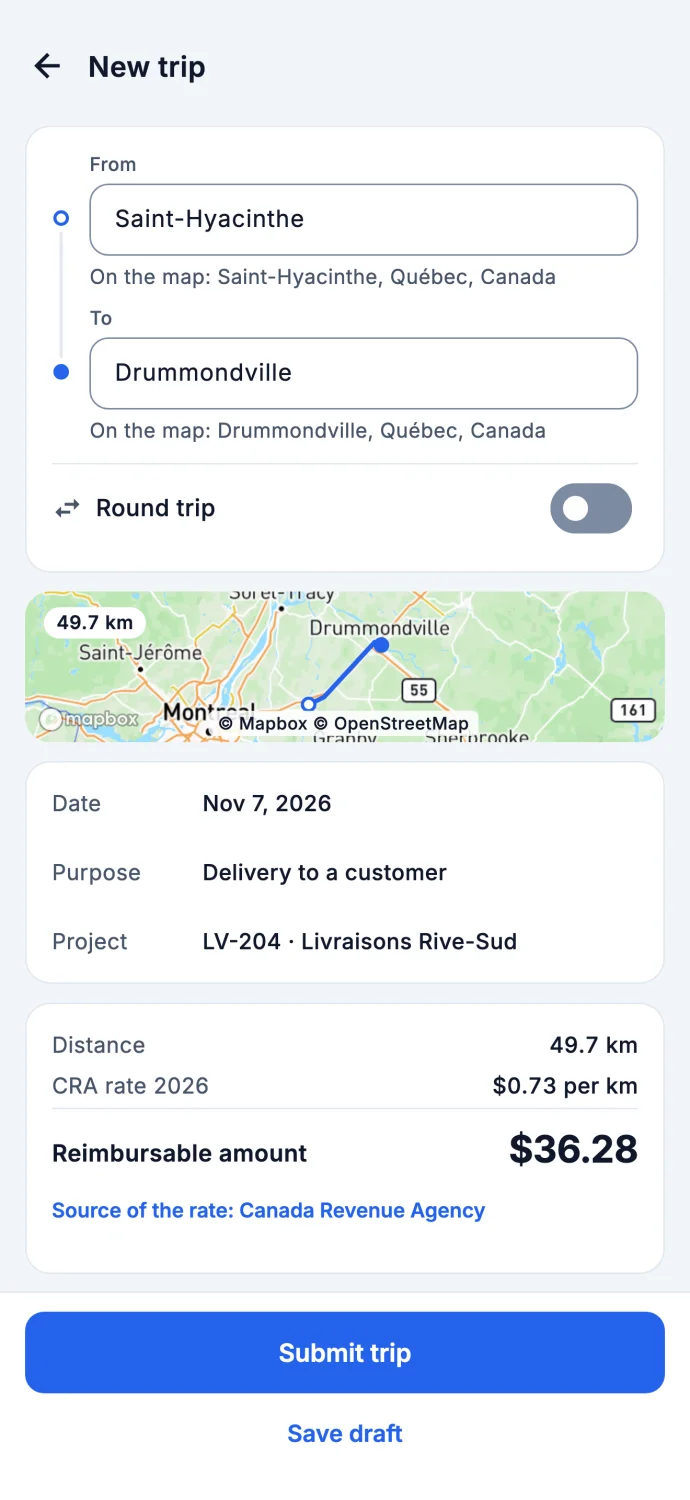
Example: the stops and the distance of each leg are illustrative; the screenshot shows the same trip, direct, of 49.7 km.
Illustrated map: a 49.7 km route draws itself from Saint-Hyacinthe to Drummondville through two numbered stops.
Screenshot of IDEP’s iPhone app: for a trip from Saint-Hyacinthe to Drummondville, distance 49.7 km, 2026 CRA rate of $0.73 per km, reimbursable amount $36.28.
iPhone app screenshot: the same trip, direct, one way
  • Several stops

    Add them, remove them, reorder them: each leg has its distance.

  • Search by place name

    A client, a station, an airport: search for the place by name, not only by address.

  • Round trip in one tap

    One switch, and the distance is doubled. Try it on the trip card.

  • The right rate, without looking it up

    Your company’s rate; otherwise the CRA scale (2026: $0.73 per kilometre for the first 5,000, then $0.67); for the public sector, the Québec Treasury Board’s.

Regulation watch

Rates change. IDEP watches, you decide.

IDEP follows the official sources: the Canada Revenue Agency, the Québec Treasury Board, Revenu Québec. When a rate changes, your administrators are told; nothing changes in your company until it adopts the new version.

Example of the notice shown to administrators, at the top of every page: “A new regulation applies from October 1, 2026. Official source: Québec Treasury Board. Nothing changes in your company until you adopt the new version.”
  1. 1

    IDEP reads the official sources

    Every day, figure by figure. If a page changes and no figure is recognized, IDEP guesses nothing: a person on the team reads it.

  2. 2

    The IDEP team checks

    It prepares the new version of your rules, with the new figures and their effective date. No figure goes through without a person checking it.

  3. 3

    Your administrator adopts

    They see what changes, then adopt the new version, or wait. The values your company set itself are kept.

Features

Everything IDEP does, plainly

Foreign currencies

Fuel paid for in the United States? IDEP converts it at the Bank of Canada rate for the receipt’s day. The original amount stays on the expense, and everyone sees the same rate.

AI assistant

Ask a question about your expenses or your company’s policies. The assistant can also draft an expense, submit one or, for those who approve, approve: always after you confirm.

It opens only with each person’s consent; its requests may be processed outside Canada.

GST 5%+QST 9.975%

Each province, its taxes

GST, QST, HST, PST: IDEP keeps each expense’s taxes, tax by tax when they are printed on the receipt, with the vendor’s tax numbers.
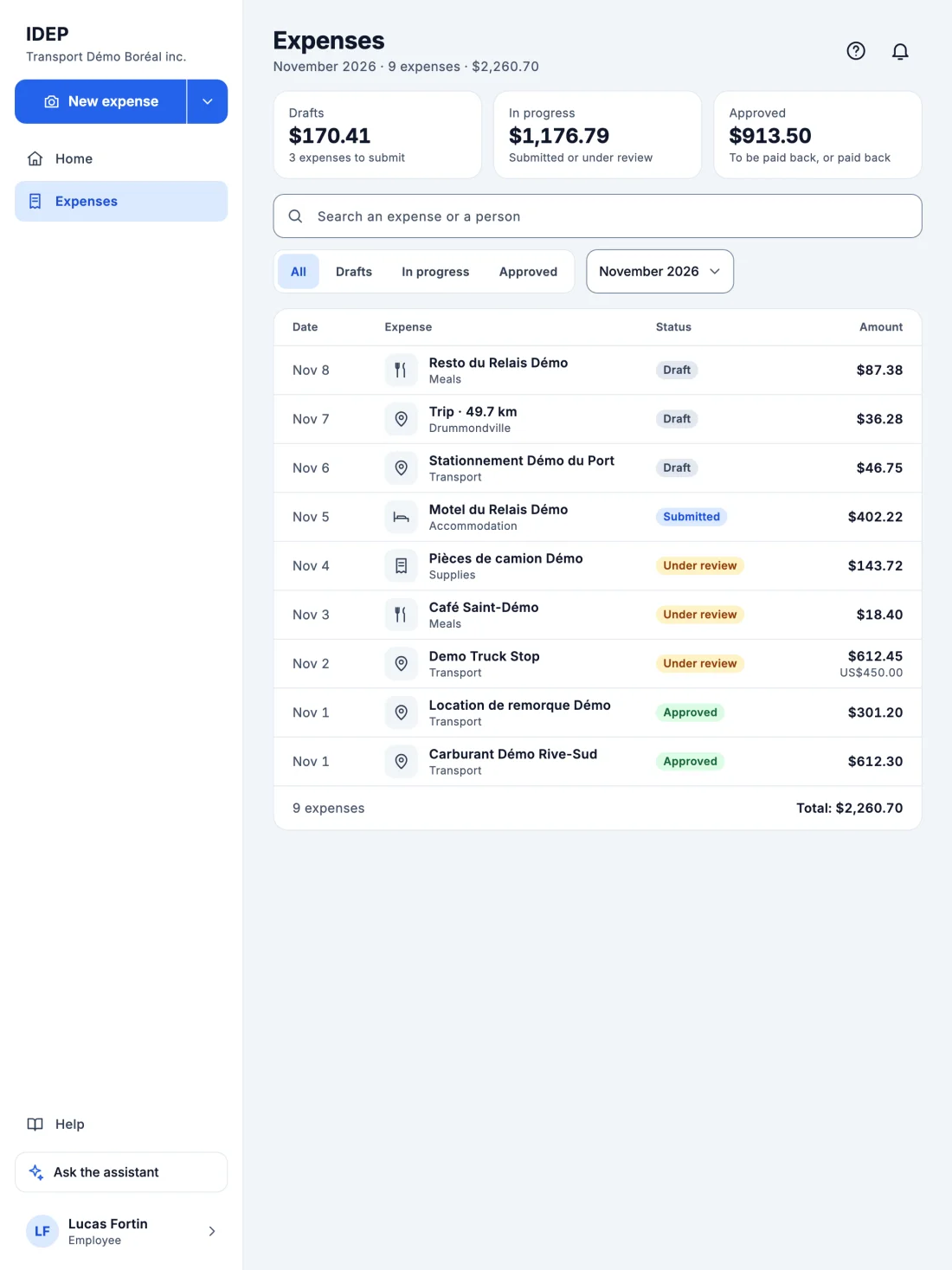
Screenshot of IDEP’s iPad app: the November 2026 expense table, with statuses and amounts.
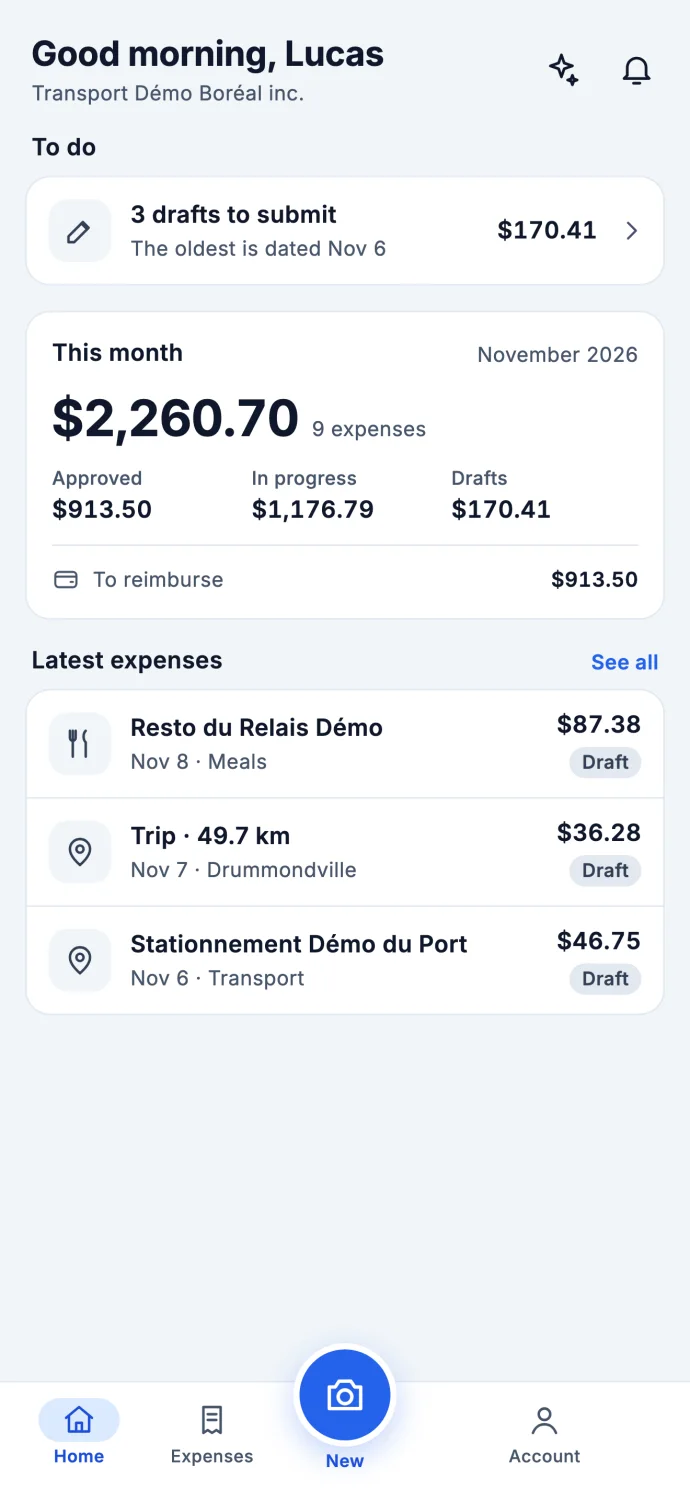
Screenshot of IDEP’s iPhone app: the home screen, with the drafts to submit and the month’s total.

On all your screens

IDEP web works on phones, tablets and computers, with the same account. The iPhone and Android apps are on their way: coming soon to the App Store and Google Play.

Screenshots of the iPad and iPhone apps, coming soon to the App Store.

Everyone sees what concerns them

An employee sees their own expenses; a manager, the ones they approve; finance and administrators, all of the company’s.

Two-step verification

Each person’s choice: an authenticator app or a code by email, with backup codes.

Set-up

Set up with you, by the IDEP team

Your categories and policies are set up with a person on the team, in IDEP Admin, its console. With Business, so is your approval chain, made to measure. Every change is written to your organization’s log.

See what gets set up
  • Categories and policies

    Limits, required receipts, extra approvals above an amount.

  • Import by file

    Your configuration and your employee list, loaded from a file by the IDEP team.

  • Custom approval chain Business

    Who approves what, step by step, with the backups.

BusinessFor organizations that want to go further, turned on with the IDEP team:

  • Single sign-on

    Your employees sign in with their Microsoft work account.

  • API keys

    Your software reads your IDEP data, limited to what you open.

  • Test environment

    A “sandbox”: try a setting without touching your real company.

Who it’s for

One app, four ways to use it

Small business and transport

Your people are on the road

  • The “Long receipt” frame for gas-station receipts and, in the apps, the flashlight for the cab at night.
  • Trips with several stops, at your company’s rate or the CRA scale.
  • Expenses incurred in the United States, converted at the Bank of Canada rate.

$7 per employee with an active account, per month; minimum $70 a month (10 employees).

See the Small business plan
Public sector

Every decision in the log

  • The Québec Treasury Board’s mileage scale, for the bodies that follow it.
  • Every expense approved by the right person, every decision kept with a name and a date.
  • A proposal prepared with you, with no listed price.
Talk about your project
Accountants

Your clients open their expenses to you

  • Read-only access, at no charge to your client: you view and you export.
  • CSV, Excel and PDF exports, on demand or scheduled.
  • Taxes kept tax by tax, with the vendor’s numbers read from the receipt.
Request a demo
For you · free

Your own expenses, for your records

  • 10 expenses a month, trips included, 5 of them read automatically from a receipt.
  • Your receipts, trips and foreign-currency expenses, in one place.
  • No AI assistant, no employees or approvals: what you record is kept for your records.
Create my personal account

IDEP is run by MOH Technology Inc., in Saint-Laurent, Québec. Your accounts, expenses and receipts are hosted in Canada.

On Microsoft Azure, Canada Central region. Some processing may happen outside Canada: the AI assistant and the interpretation of the receipts the server reads, by Microsoft Azure OpenAI, with each person’s consent, and trip addresses, by Mapbox.

Read the privacy policy

Plans

A listed price, the same for every employee

Start with a 30-day free trial, no credit card, up to 5 employees. Prices in Canadian dollars, before taxes.

Small business

$7per employee with an active account, per month

Minimum $70 a month (10 employees). Yearly: $70 per employee, two months free; minimum 3 employees. Up to 250 active accounts.

Business

On request

Demo, guided set-up, single sign-on, API keys, test environment.

Public sector and enterprise

Prepared with you

No listed price: a proposal made to measure.

Personal

Free

One person: 10 expenses a month, trips included, 5 of them read automatically from a receipt.

See what each plan includes

Your next receipt deserves better than a shoebox.

Create your account and invite your team: the trial is free for 30 days, with no credit card, for up to 5 employees.